
Delta Executor
Delta Executor is a Roblox script client that follows you from desk to pocket. One workspace, one script cloud, one login across every device — pick up your last tab wherever you left it, with no re-installing, no re-linking, and no key gate.
✓ All Devices Supported (PC, Android, iOS)
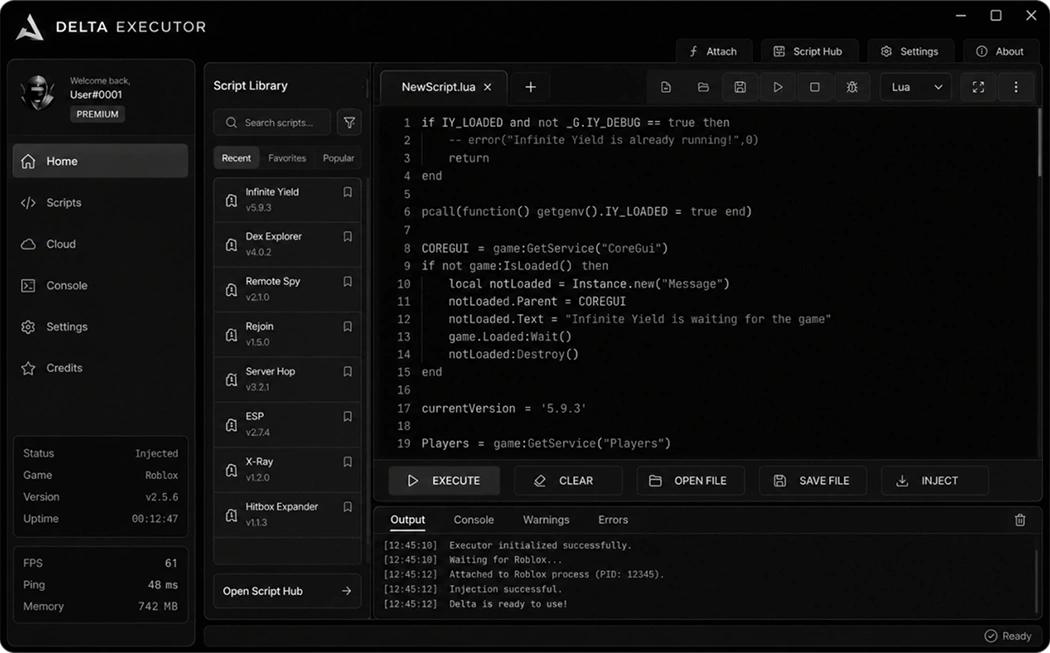
[ UI RENDER ]
Status
Fully Updated
ONLINE
> HWID SPOOF: OK
> MEM_HOOK: OK
> AWAITING INJ_
What's Inside
Built for real workflows
Every part of Delta Executor — from the tabbed editor to the QR pairing screen — was shaped by feedback from people who actually run scripts every day, on desks and on phones.
Workspace with drag-out tabs
Keep a dozen scripts open at once inside Delta Executor. Every buffer lives in its own tab, tabs can be torn off into a second window, and a split view lets you diff two files while a third one runs — the whole layout is remembered between sessions.
Scan-to-pair devices
Point your phone at the QR square on your desktop and both sides sign into the exact same workspace — delta pc and the mobile builds — with no email codes and no re-typed passwords.
Roblox-aware IntelliSense
The Delta Executor editor indexes the current DataModel while you type and offers real completions — instance children, service names, remote signatures — instead of guessing from a static list.
↳ GetService(className)
game:GetService("Players")
Native floating overlay
On the delta apk build and on iOS, a small resizable Delta Executor window rides on top of the game — drag it out of the way, pin it to a corner, or hide it with a two-finger swipe.
Live library across devices
Save a snippet on the desk, keep working from bed on your phone. Your script folders, editor layout and last-run history replicate the moment they change — start the delta executor download anywhere and everything is already there.
Get The App
Installation Guide
Pick your platform for Delta Executor. The installer for each build is under 25 MB and every step below is written for a fresh machine — no assumed prior setup.
Download
Fetch the current archive and drop it anywhere you like — no fixed install path required.
Exclusions
Add the folder to your antivirus allow-list. All script clients trip heuristic scanners; it's expected.
Extract
Unpack the archive and launch DeltaExecutor.exe with elevated rights on first run only.
Attach
Join a game, then hit Attach in the workspace toolbar. Status turns green when ready.
Execute
Paste a script into any tab, press Ctrl+Enter, and it runs inside the current place.
✦ Download For Windows ✦
Windows 10/11, 64-BitDevelopment Hub
Changelog & Updates
A running log of what shipped in Delta Executor. Every release is annotated by the engineer who worked on it — no marketing fluff, no vague "improvements & bug fixes".
Update History
Version 3.4.1
LatestReleased: 02 July 2026
Hotfix · Anti-Cheat Fortification
A small maintenance drop after a quiet Roblox client push. Reworks how the client reconnects when the game re-hydrates its DataModel, and closes a cold-boot hang on Windows 11 preview builds where WinRT initialised in an unexpected order.
-
UPDATE
Layout persistence rewired — the tab bar, split-view ratios and pinned windows are now snapshotted on every close and rehydrated on startup instead of on first tab switch. Cold-start feels instant.
-
IMPROVED
Editor input latency trimmed by ~11 ms — batched the debounced parse pass and moved syntax colouring off the input thread. Feels noticeably crisper on lower-refresh laptop screens.
-
FIXED
Startup hang on Windows 11 preview 27xxx — WinRT bootstrap fired before our config directory was mounted, deadlocking on first read. Now fenced behind a mount check.
Community Library
Popular game hooks
A short slice of what's trending in the Delta Executor hub this week. Every entry is user-submitted, moderated by the team, and tagged with the last time it was tested against a live game.
Grow a Garden
Community-favourite garden hub. Auto-plant, seed reroller and a passive coin collector that pauses when the world is empty.
Rivals Script
A lean aim assist plus a lobby ESP toggle. Author ships a "casual mode" preset that softens the tracking curve.
Dead Rails
Chest waypoints, boarding assist, and a fuel-priority routine that keeps the train alive across long stretches.
Blox Fruits Auto
Fruit spawn tracker, level-appropriate quest picker, and a Sea Beast farm that queues while you sleep.
Da Hood Aimlock
Movement helpers with a stomp-back toggle. Comes with per-server hotkey remapping so muscle memory carries over.
Blade Ball Pro
Deflection timing helper with reaction-window sliders. Doesn't auto-play — it just highlights when to press.
Universal Farm
A generic pathing tool: record a route through any game, save it as a preset, replay it later on any of your devices.
+8000 Scripts
Search, filter and preview from within the client. Tagged by game, verified date and platform support.
Community Feedback
User Reviews
Real notes from real Delta Executor users, straight out of the in-app feedback form. No copy-pasted testimonials, no paid shoutouts.
"Been rotating tabs between two Rivals loadouts and a Blox Fruits farm without a single re-inject. Whatever they did with the tab manager, I need in every app I use."
"Paired my delta pc with my phone by scanning the QR — the mobile side asked me if I wanted to import my saved scripts and just… did. Felt weirdly nice for a game tool."
"Ran the delta apk on a two-year-old A54 during a car trip. Overlay stays out of the way, and the floating window remembers where I dragged it. Way past what I expected from a phone build."
"Autocomplete pulls actual instance names from my current place, which almost feels like cheating when writing throwaway scripts. Only nitpick is I want fuzzy search in the completion list."
"Cloud sync saved me during a stream last week — laptop battery died mid-session, opened the delta ios build on my iPad, and every open buffer was already there. Chat thought I was joking."
"The split-view thing is what made me stop looking around. I diff two versions of a farm script side by side while a third runs. It's a whole different workflow now."
"Coming from a build that shipped a 60 MB installer, the delta executor download here was under 20 MB and started up in about a second on my old ThinkPad. Refreshing."
"Zero linkvertise, zero \"solve 3 captchas\" screens, zero \"click here to continue\" nonsense. Downloaded, opened, ran a script. That's the whole story."
Support Center
Common Issues
A curated list of the questions the support inbox gets most often. Filter by category on the left, or expand any row for the actual fix.
Last updated: v3.4.1
02.07.2026
Symptom
You scan the QR code on the desktop with a mobile build, the phone shows "Connecting…", then times out after roughly 15 seconds without pairing.
Solution
- Make sure both devices are on the same local network — the handshake uses a direct LAN channel before falling back to relay.
- Refresh the QR code (the code rotates every 60 seconds) and rescan; an expired token cannot complete the pairing.
- On the phone, allow the app camera and local network permissions in system settings, then relaunch.
- If the LAN is blocked (public Wi-Fi, corporate network), switch either device to a hotspot — pairing will complete in a couple of seconds.
Symptom
A yellow banner appears above a script that says "Two versions differ — pick one to keep". Usually triggered when the same file was edited on delta pc and delta ios at the same time.
Solution
- Open the diff panel by clicking the banner — the two versions appear side by side with the changed lines highlighted.
- Pick "Keep left" or "Keep right", or use the merge editor to hand-pick lines from both. The choice replicates back to every paired device.
- To avoid future conflicts, enable "Soft lock while editing" in Sync Settings — a device grabs a short lease when you start typing, and other devices open the file read-only until the lease releases.
- Very old edits (over 14 days behind) show as "stale" instead of a conflict and are archived under the file's history menu for one-click restore.
Symptom
You installed the delta executor apk, opened Roblox, but the floating menu never shows up over the game. Two-finger swipe does nothing.
Solution
- Go to Settings → Apps → Delta → Special app access → Display over other apps and flip the toggle on.
- On MIUI, ColorOS and OneUI, also enable "Auto-start" for Delta in the battery panel — some OEM skins kill background services silently.
- Force-stop the app, relaunch it, then re-open the game. The overlay should appear within a couple of seconds.
- If nothing happens, tap Preferences → Overlay → "Test overlay" — a small square should draw on top of anything. If it doesn't, the permission was not granted properly.
Symptom
The Delta Executor editor works normally but no suggestion list opens when you type a partial identifier. Manual trigger with Ctrl+Space also does nothing.
Solution
- The completion engine reads from the attached place's DataModel. If Delta is not attached yet, only static Lua keywords will show — attach first, then keep typing.
- Check Settings → Editor → "Suggestions" — the master toggle can be flipped off accidentally by a preset import.
- Rebuild the completion index from the command palette (Ctrl+K → "Rebuild suggestions"). Takes about half a second on a normal place.
- Very large DataModels (100k+ instances) throttle the popup; raise the "Max index size" slider in the same settings pane if you're working in a stress-test place.
Symptom
You set up a specific split-pane layout inside Delta Executor (say, 60/40 with two files pinned), close the client, reopen, and it comes back as one pane again.
Solution
- Update to v3.4.1 or later — layout persistence was rewritten to snapshot on close instead of on tab switch, which fixes the reset for good.
- If you're already on the latest build, delete
/config/workspace.stateonce. It rebuilds automatically and forgets any corrupted layout. - Make sure "Restore last workspace" in Preferences → Startup is on. It ships enabled but a shared config file may have flipped it off.
Symptom
The delta ios client stops receiving updates from delta pc after a while off-screen. Tapping back in shows a spinner for a second before catching up.
Solution
- This is expected — iOS and modern Android suspend background network sockets after a few minutes to preserve battery. The catch-up spinner on foreground is the reconnect handshake.
- To speed up the reconnect, enable "Background App Refresh" for Delta in iOS Settings, or exclude Delta from battery optimisation on Android.
- If catch-up takes longer than 3 seconds, tap Preferences → Sync → "Force full pull". It re-hydrates the entire library from cloud in one shot.
- Push notifications on important sync events (conflict, new device paired) work even while backgrounded — enable them under Preferences → Notifications.
Context
A quick reference for what to click after a fresh install — especially if you plan to pair a second device (delta ios or delta apk) later.
Step-by-step
- Extract the archive to a folder you own — no fixed install path required. Portable layout, nothing lands in the registry.
- Whitelist the folder in your antivirus before the first launch. All script clients trip heuristic scanners; this is expected.
- Open the app, join a game, hit Attach. The status pill turns green when the workspace hooks in.
- Optional but recommended: click the QR icon in the sidebar and scan it with your phone. Both devices now share the same workspace.
- Save a throwaway script into a folder called Personal just to see sync in action — it appears on the phone within a second or two.
Symptom
The delta ios build opened fine after sideloading, but a week later the app icon greys out and iOS shows "Untrusted enterprise developer" when tapped.
Solution
- This is the standard Apple free-developer certificate lifetime — signatures on sideloaded apps expire after 7 days. It is not a Delta bug.
- Re-sign the app: reopen your sideload tool (AltStore, Sideloadly, Scarlet) and refresh the app. Takes about a minute.
- To automate this, keep AltServer running on your desktop — it re-signs installed apps in the background over Wi-Fi as long as both devices are on the same network.
- With a paid Apple Developer account, signatures last a full year and the reminder disappears entirely.
Grab the current Delta Executor build
One installer, three platforms, one account across all of them.
Knowledge Base
Frequently Asked Questions
The questions people ask before they install. Nothing here overlaps with the Troubleshooting list — that one is for after.